Natis Powerpoint Template: Crafting Your Next Presentation
A Multipurpose Foundation for Any Slide Deck
Every professional eventually faces the pressure of building a slide deck that needs to look polished, persuasive, and clear. The challenge is balancing time constraints with the need for high-quality visuals. This is where the Natis Powerpoint Template enters the conversation. It is not merely a collection of static slides; it is a comprehensive design asset built for versatility. Whether you are an entrepreneur pitching investors, a marketer outlining a quarterly strategy, or a designer presenting a portfolio, this template provides a robust framework that adapts to your content rather than forcing your content to fit a rigid mold.
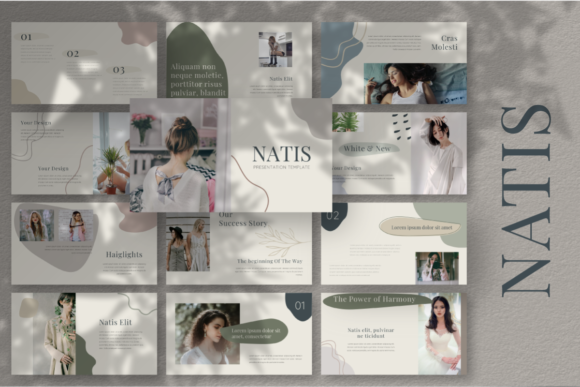
The defining characteristic of the Natis Powerpoint Template is its modern layout. It moves away from cluttered, text-heavy designs and embraces a clean, visual-first approach. The aesthetic is professional yet contemporary, relying on strong typography and ample white space to create a sense of sophistication. This is a creative multipurpose tool, meaning it respects the principles of modern typography while maintaining the flexibility required for diverse industries. It does not scream for attention with flashy gimmicks; instead, it earns authority through structure and visual clarity.
Anatomy of the Visual Style and Layout
When you open the Natis Powerpoint Template, the first thing you notice is the organization. With 60 slides included, the template is divided into specific categories such as "Opening Slides," "Our Team," "Our Services," and "Portfolio." This structure is vital for visual hierarchy. It guides the speaker—and the audience—through a logical narrative flow. For a small business owner, this means you don't have to invent the wheel. You simply select the slide that fits your current thought, whether it is introducing your team members or displaying data through editable charts.
Visually, the template is based in Master Slides. This is a crucial technical feature for anyone serious about branding. By utilizing master slides, the Natis Powerpoint Template ensures consistency across all 60 pages. If you need to adjust a color palette or shift a logo placement, you do it once in the master view, and the change reflects globally. This capability is essential for maintaining brand identity. The design also features a multicolor base, offering a vibrant yet balanced palette that can be easily tweaked. The easy color change feature ensures that the template can be adapted to match specific corporate guidelines in seconds.
Another standout element is the handling of imagery. The template relies on images placeholders and a drag and drop interface. This is a practical lifesaver. Instead of manually resizing and cropping photos to fit awkward boxes, you simply drag your high-resolution image into the designated area, and the template handles the rest. This focus on usability extends to the vector based icons included in the pack. Because they are vector-based, they remain crisp and sharp regardless of screen resolution, ensuring your presentation looks Full HD and professional on any projector or monitor.
Practical Applications: Beyond the Boardroom
While the Natis Powerpoint Template excels in corporate environments, its utility stretches far beyond standard business meetings. Its clean, modern, multi-purpose design makes it a strong contender for creative professionals. For instance, a freelance graphic designer can utilize the unique portfolio slides to showcase their work. The layout is designed to let the images breathe, ensuring that the artwork—not the slide decoration—takes center stage. This makes it an ideal choice for branding presentations or advertising pitches where visual impact is everything.
For those in publishing or content creation, the template’s focus on typography and usability is a significant advantage. The predefined text styles help maintain readability. You are not just getting a box to type in; you are getting a typographic system that ensures headings, subheadings, and body text are balanced. This attention to detail influences audience engagement. When text is easy to read and well-spaced, the audience can focus on the message rather than struggling to decipher the font or layout.
Consider the needs of a blogger or a social media manager. They often need to create quick reports for clients or media kits. The Natis Powerpoint Template serves as a reliable creative font and layout package that elevates these routine documents. It transforms a standard monthly report into a professional presentation that reinforces professionalism and brand perception. It is also worth noting that the media placeholders work perfectly for embedding video snippets or social media mockups, making it a versatile tool for digital storytelling.
Integrating Natis into Your Workflow
Adopting a new template into your workflow should be seamless. The Natis Powerpoint Template is designed to be intuitive. The drag and drop image functionality reduces the technical barrier to entry, making it accessible even for those with limited design software experience. However, to get the most out of the asset, it is helpful to approach it with a strategic mindset.
Start by reviewing the Master Slides. Before you begin adding content, set up your brand colors and fonts globally. This ensures that every slide you create automatically adheres to your brand identity. Next, look at the editable charts. Data visualization is often the weakest link in presentations, but this template provides a structured way to display statistics clearly. Use these charts to break up text-heavy sections and provide visual proof for your claims.
It is also important to treat the images with care. While the template provides placeholders, the quality of the final presentation depends on the assets you put into it. Use high-quality photography. The modern layout is designed to frame high-resolution images, so low-quality graphics will stand out negatively. Think of the template as a high-end picture frame; it enhances the art, but it cannot fix a blurry photo.
Final Thoughts on Utility and Quality
The Natis Powerpoint Template represents a practical investment for anyone who communicates ideas visually. It bridges the gap between corporate functionality and creative flair. It is a tool that respects the user's time by offering professional design out of the box, while still providing the flexibility needed for customization.
For the entrepreneur, it offers a professional face for their business. For the designer, it offers a clean canvas for their portfolio. For the marketer, it offers a structured way to present strategy. By combining 60 slides of carefully curated content with user-friendly features like easy color change and vector icons, this template stands as a robust solution for modern presentation needs. It proves that you don't need to spend hours building slides from scratch to achieve a high-end, Full HD