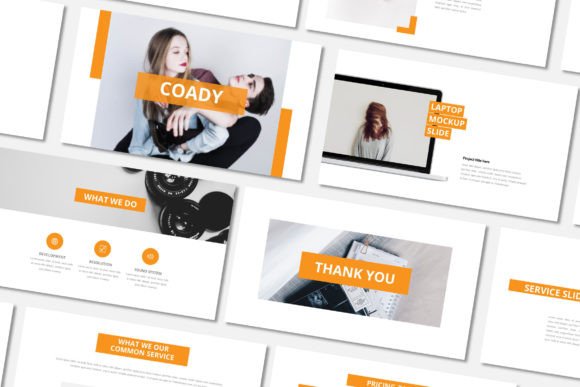
Coady Google Slides: Build a Clear, Modern Plan
A Practical Template for Real Business Needs
Finding the right presentation template can feel like searching for a specific tool in a cluttered workshop. You need something that works, looks professional, and doesn't require a manual to operate. The Coady Google Slide Presentation Template is built for that exact purpose. It’s a clear, modern framework designed to help you structure and present a business plan, project proposal, or creative pitch without unnecessary complexity.
What makes it stand out is its commitment to clarity and function. This isn't about flashy animations or overly decorative elements. The visual personality is minimal and clean, using ample white space and a structured layout to guide the viewer's eye. The style is contemporary and professional, suitable for a boardroom, a client meeting, or an investor pitch. Its appeal lies in its versatility—it provides a solid, modern typography foundation that lets your content take center stage.
Where This Template Excels
The Coady Minimal Google Slides Template is a workhorse for a variety of professional contexts. Its 16:9 wide screen ratio and masterslide based design ensure consistency across all 35 slides, which is critical for maintaining a brand identity during a presentation.
For entrepreneurs and startups, it’s an ideal canvas for a pitch deck. The clean lines and structured sections help present financials, market analysis, and product roadmaps in a digestible way. Marketing agencies and corporate teams can use it for quarterly reviews, campaign proposals, or internal strategy sessions. The template’s neutrality allows it to adapt to different brand guidelines simply by changing the colors and dropping in company logos using the picture placeholder feature.
It’s equally effective for creative studios, artists, and designers building a portfolio or presenting a project. The minimalist aesthetic doesn’t compete with your work; instead, it frames it professionally. Even for personal use, such as planning a community project or presenting a hobbyist group’s yearly goals, the template provides a polished, organized structure that elevates the message.
Practical Guidance for Using Coady
Getting the most out of the Coady Google Slide Presentation Template is straightforward, but a few practical tips can enhance your workflow.
Evaluate the Fit: Before diving in, skim through all 35 slides. The template is versatile, but its strength is in clear, linear communication. If your content is highly narrative or requires complex, non-linear storytelling, you might need to adapt more heavily. For standard business plans, project outlines, and portfolios, it’s a perfect fit.
Customize with Purpose: The easy color change feature is powerful. Don’t just pick your favorite color; use it strategically. Apply your primary brand color to key headings or accent elements for visual hierarchy. Stick to a palette of 2-3 colors maximum to maintain the template’s clean, professional feel. Remember, the goal is to enhance readability, not to decorate.
Master the Drag & Drop: The picture placeholder system is a major time-saver. Use high-quality, relevant images that directly support your message. Avoid generic stock photos where possible. For a product pitch, use crisp product shots. For a creative portfolio, showcase your best work. The placeholder ensures your images are consistently sized and positioned, which is a subtle but important detail for a polished brand identity.
Focus on Content and Flow: With the design handled, pour your energy into the content. Use the slides to create a logical flow. Start with the problem or opportunity, present your solution, provide evidence or a portfolio, outline the plan, and conclude with a clear call to action. The template’s structure supports this classic persuasive flow.
Consider Your Audience: This template communicates professionalism, clarity, and modernity. It’s best for audiences who value substance and organization—investors, clients, senior management, or collaborators. The free font used is legible and contemporary, ensuring your text is readable even from a distance in a conference room.
By leveraging the Coady Google Slide Presentation Template’s inherent strengths—its clean design, easy customization, and comprehensive slide library—you can create a presentation that feels both professional and uniquely yours. It’s a practical design asset that saves time while ensuring your ideas are presented with the clarity and impact they deserve. The included documentation file and font instructions in the Read Me.txt provide all the technical support you need to get started immediately.