Elevate Your Visuals with the Anthum Presentation Template
Let’s be honest: the default PowerPoint slide templates are often a last resort. They look dated, they lack imagination, and they rarely align with the sophisticated aesthetic of a modern brand. If you are pitching a client, launching a product, or presenting a portfolio, you need a canvas that works as hard as you do. This is where the Anthum Powerpoint Template enters the conversation. It is not just a collection of slides; it is a design system built for professionals who understand that presentation matters as much as the content itself.
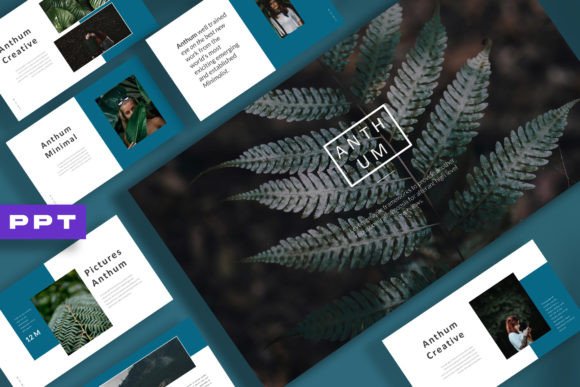
Anthum is defined by a modern, creative, and minimalist theme. It strips away the clutter often found in corporate templates and replaces it with clean lines, intentional white space, and a layout that breathes. The personality of this template is confident and sleek. It doesn't scream for attention with neon colors or unnecessary animations; instead, it commands respect through structure and elegance. Whether you are in the fashion industry looking to showcase a new line or a tech startup explaining complex data, Anthum provides a visual language that feels premium and polished.
A Design System Built for Speed and Flexibility
One of the biggest hurdles in presentation design is the technical barrier. Many templates look great in the preview image but become a nightmare to edit. Anthum solves this with a fully integrated Slide Master. For those unfamiliar, the Slide Master is the control center of your PowerPoint file. By editing the master, you can change global elements—like your logo placement or color palette—across the entire deck instantly. This feature is a massive time-saver for brand consistency. If your brand identity shifts or you need to adapt the presentation for a different client, you aren't stuck manually changing every single slide.
Beyond the Slide Master, the template is built with auto-adjustment capabilities. This means the layout is intelligent. When you resize an image or move a shape, the other elements on the slide respond logically. This dynamic behavior is crucial for maintaining the visual hierarchy of your slides. You want the audience's eye to flow naturally from the headline to the supporting text and finally to the visual focal point. Anthum’s grid system ensures that even if you aren't a trained designer, your slides will look balanced and professional.
Perfect for Fashion, Branding, and Business
The versatility of the Anthum template makes it a standout design asset. Its 16:9 aspect ratio is the standard for modern displays, ensuring your content fills the screen without awkward black bars. However, the real magic lies in its aesthetic adaptability.
For fashion and branding, the minimalist layout acts as a gallery. It allows high-quality photography to take center stage. The included devices mockups are particularly useful here. Instead of just showing a screenshot of a website or an app, you can place your content inside a realistic device frame. This adds depth and context to your digital projects, helping clients visualize exactly how their brand identity will live in the real world. Whether you are presenting a web design concept or a social media strategy, these mockups bridge the gap between concept and reality.
For business and marketing, the clarity of the typography and the structure of the charts allow data to be digested easily. The design avoids the "corporate stiff" look, offering a more creative approach to quarterly reports or investor pitches. It feels contemporary, suggesting that the company behind the presentation is forward-thinking and innovative.
Practical Application and Customization
Using the Anthum Powerpoint Template effectively requires a bit of strategy, even with its "easy to edit" promise. Here is how to get the most out of this asset:
- Color Palette Integration: The template is designed to be recolored easily. However, don't just swap the default colors for your brand's primary red or blue without considering contrast. Use the Slide Master to test your brand identity colors against the white or dark backgrounds provided. Ensure your text remains readable.
- Typography Choices: While Anthum comes with its own style, you may want to pair it with your specific brand fonts. When doing this, maintain the visual hierarchy. If you use a heavy serif for headers, stick to a clean sans serif for body text. The template’s layout is spacious, so you can afford to let your typeface breathe—avoid cramming text into the corners.
- Image Selection: The template credits Unsplash for placeholder images. This is a hint: high-quality, artistic photography works best here. Because the design is minimalist, a low-resolution or cluttered stock photo will stick out like a sore thumb. Curate your imagery carefully to match the sophisticated vibe of the template.
Ultimately, Anthum is more than just a Premium Powerpoint Template; it is a tool for better communication. It removes the friction of design so you can focus on your message. Whether you are a small business owner trying to land a new contract or a content creator building a media kit, this template provides the professional polish required to make a lasting impression. It proves that you don't need to be a graphic designer to create presentations that look like they were made by one.