Mastering the Isabella PowerPoint Presentation
Beyond Slides: A Visual Identity Toolkit
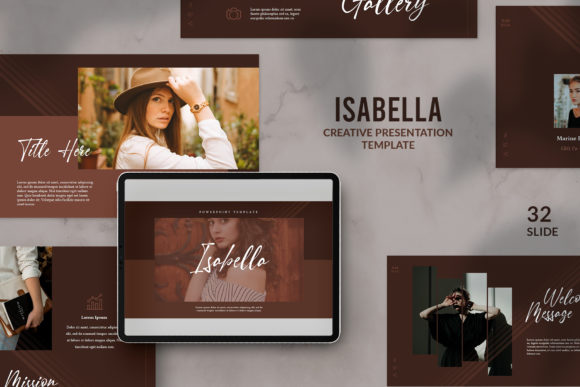
When you first open the Isabella PowerPoint Presentation, you might be tempted to view it simply as a collection of 32 slides. However, looking closer, it becomes clear that this is a comprehensive visual strategy packaged in a .pptx file. For designers, entrepreneurs, and content creators, the challenge is rarely starting from a blank canvas; it is maintaining a high standard of aesthetic consistency without spending hours tweaking pixels. Isabella solves this by offering a distinct personality that blends modern minimalism with bold, architectural structure. It is designed for those who want their content to feel curated and intentional, rather than chaotic or generic.
The visual character of this template relies heavily on contrast. The layout designs are clean and spacious, allowing text and images to breathe, while the signature black overlay designs provide a grounding, dramatic effect. This is not just about making things look "pretty"; it is about creating a visual hierarchy that commands attention. Whether you are a blogger showcasing a photography portfolio or a startup founder pitching to investors, the aesthetic here signals professionalism. It moves away from the cluttered, bullet-point-heavy slides of the past and embraces a modern typography approach where the image is just as important as the text.
Practical Customization: Making the Template Your Own
A template is only as good as its flexibility. One of the standout features of the Isabella PowerPoint Presentation is the intuitive "drag-and-drop" functionality for images. In the past, inserting a custom image into a PowerPoint placeholder often resulted in awkward cropping or distorted aspect ratios. Here, the placeholder icon system is built to handle your assets gracefully. You simply drag your image into the designated area, and the software handles the rest. This saves a significant amount of time, particularly for small business owners who need to update their decks regularly for client meetings or internal reviews.
However, the real power lies in the background customization. To truly make this template yours, you need to master the "Format Background" settings. By right-clicking the background and selecting "Picture or texture fill," you can insert your own imagery. This is where you apply your specific brand identity. If you are a travel blogger, this might be a soft, atmospheric landscape; for a corporate agency, it could be a subtle texture or a high-resolution office shot. The trick is to utilize the black transparent overlays provided. When you layer your image under a semi-transparent black design element, you ensure that your white text remains readable, regardless of how busy your background photo is. This technique creates a professional look that balances visual interest with clarity.
Typography and the "Don't Forget" Rule
There is a specific instruction included with the Isabella package that many users overlook to their detriment: "Don't forget to download and install the font first." This is not a minor technicality; it is the foundation of the design's success. Typography is the voice of your presentation. The Isabella PowerPoint Presentation relies on specific typefaces to achieve its elegant, editorial look. If you open the file without the correct fonts installed, PowerPoint will automatically substitute them with a default system font like Calibri or Arial. This substitution instantly strips the design of its personality, ruining the carefully crafted spacing and contrast.
By taking the five minutes to install the recommended font, you preserve the visual hierarchy. The relationship between the headers and the body text is designed to guide the viewer's eye naturally. When that relationship is broken by a mismatched font, the entire deck feels disjointed. Think of the font as the glue holding the graphic design elements together. It ensures that whether you are presenting on a large screen or sharing a PDF on social media, your message is conveyed with the intended sophistication.
Strategic Applications for Modern Creators
The versatility of the Isabella PowerPoint Presentation extends far beyond traditional business meetings. For content creators and marketers, this asset can be repurposed in several high-value ways. Because the layouts are so image-centric, they are perfect for creating social media graphics. You can design individual slides, export them as high-resolution JPGs or PNGs, and use them as Instagram carousels or Pinterest pins. The consistent design language ensures that your social feed looks cohesive, which is a key factor in building a recognizable online presence.
Furthermore, for those in the publishing or editorial design space, the template serves as an excellent mood board generator. The ability to mix and match layouts allows you to present storyboards, color palettes, and copy drafts in a format that clients will actually enjoy reading. Small business owners can also use it to create media kits or lookbooks. Instead of sending a plain text document, you can present your brand story using the black overlay designs to create a cinematic feel. This elevates your perceived value before you even speak a word.
Finalizing Your Design Workflow
When working with the Isabella PowerPoint Presentation, remember that simplicity is your greatest ally. The design is already strong, so resist the urge to overcomplicate it with too many clip-art icons or excessive text. Trust the white space. Let the images do the heavy lifting. If you are using this for a client project, the ease of use allows you to iterate quickly. You can present three different visual directions simply by swapping out the background images and adjusting the color overlays.
Ultimately, this presentation template is about bridging the gap between amateur and professional design. It provides the structure and aesthetic rigor that non-designers often struggle to create from scratch, while offering enough flexibility for creatives to inject their unique flair. By following the installation instructions and utilizing the customization features, you transform a static file into a dynamic part of your design assets