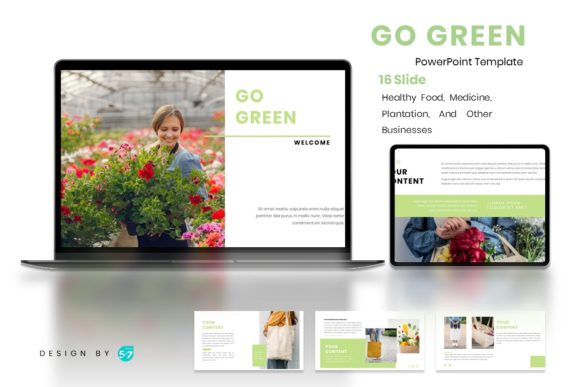
Go Green: A PowerPoint Template for Modern, Nature-Inspired Presentations
In a world saturated with generic slide decks, finding a presentation template that feels both fresh and professional can be a challenge. The PowerPoint Template - Go Green steps into this space with a clear purpose: to offer a visually cohesive and modern solution for anyone looking to communicate ideas with a clean, nature-inspired aesthetic. This isn't just another set of slides; it's a designed system for visual storytelling.
At its core, the Go Green template is built on a foundation of simplicity and elegance. Its visual personality is calm, organic, and contemporary. You'll find layouts that balance ample white space with strategic pops of green, creating a sense of clarity and focus. The design style leans towards a modern minimalism, using clean lines and thoughtful typography to guide the viewer's eye. The overall appeal lies in its versatility—it feels at home presenting a new wellness brand, a sustainable business plan, or a community gardening initiative without feeling cliché or overly literal.
Where This Template Finds Its Strength
The true value of a well-designed template like Go Green is its ability to adapt across various contexts. For designers and brand strategists, it serves as an excellent starting point for client presentations, especially for brands in the wellness, health food, or eco-friendly product space. The consistent style helps maintain brand identity throughout a pitch, reinforcing professionalism.
Entrepreneurs and small business owners can leverage its clean structure to present business plans, product launches, or partnership proposals. The template's modern layout helps distill complex information into digestible visual segments, making your message more accessible. For marketers and content creators, it's ideal for crafting social media strategy decks, campaign overviews, or influencer collaboration proposals. The 16-slide structure provides enough room to develop a narrative without overwhelming the audience.
Even beyond the boardroom, its applications are practical. Bloggers and publishers can use it to create media kits or outline editorial calendars with a polished look. Crafters and hobbyists might find it useful for planning workshops, organizing community events, or presenting project ideas to potential collaborators or venues.
Practical Guidance for Effective Use
Adopting a new design asset requires a bit of strategy. Here’s how to integrate the Go Green PowerPoint Template effectively into your workflow.
Evaluate the Fit: Before diving in, ask if the template's personality aligns with your project's tone. Its organic, modern style is perfect for topics related to health, sustainability, innovation, and education. For a corporate finance report or a high-energy gaming launch, you might need to adjust the color scheme significantly or consider a different template altogether.
Master the Editable Features: The template is built on Master Slides, which is a huge time-saver. To change a color or font globally, edit the Master Slide once, and the change will propagate across all 16 slides. The vector icons and resizable graphics are fully editable, meaning you can tweak them to match your exact brand colors. The picture placeholders allow for simple drag-and-drop image insertion, ensuring your visuals are perfectly framed within the design.
Consider Your Typography: While the template recommends free web fonts, you have the freedom to experiment. The clean layout pairs well with both sans serif fonts for a contemporary feel and serif fonts for a touch of classic elegance. If you're presenting a brand with a specific typeface, integrate it here to strengthen brand identity. The key is maintaining readability; ensure your chosen font has good contrast against the background and is large enough to be seen clearly in a presentation setting.
Leverage the Structure for Visual Hierarchy: Use the provided layouts to create a clear visual hierarchy. Title slides should grab attention, content slides should present information in digestible chunks, and closing slides should leave a memorable impression. The template's design naturally guides this flow, but your content strategy will bring it to life. Replace placeholder text with concise headlines and supporting points rather than lengthy paragraphs.
Check the Licensing for Commercial Use: The files included are the PowerPoint (.PPTX) file and documentation. Always review the documentation for specifics on commercial licensing. Typically, templates like this allow for use in commercial projects for clients, but it's crucial to verify what is and isn't permitted, especially if you plan to distribute the final presentation file itself.
The PowerPoint Template - Go Green is more than just a collection of slides; it's a design framework. By understanding its visual strengths and applying its features thoughtfully, you can create presentations that are not only informative but also visually engaging and professionally consistent. It’s a practical tool for anyone who needs to communicate ideas with clarity and a touch of modern elegance.